


Welcome to the world of laser crafting! Whether you’re personalizing gifts or launching a small business, your new J Tech laser—like the 64W 3-in-1—packs serious potential. This laser settings starting guide should get you going fast! But before you start blazing trails into wood, let’s talk about feedrate and power settings, the two most important factors for success.
Understanding Feedrate & Power
- Feedrate is how fast your laser moves over the material (measured in inches per minute or in/min).
- Power refers to the intensity of the laser beam (usually controlled via PWM, 0–100%).
General Rule of Thumb:
- Slower = Deeper & Darker Burn
- Faster = Lighter Mark & Less Penetration
Important: Cutting too slowly is unsafe. Never go below 10 in/min to avoid fire hazards.
Recommended Starting Points
These laser settings guide values are for birch plywood and assume proper laser focus and air assist is in use. Adjust settings based on your specific machine, material, and environment.
Vector Engraving
| Laser Power | Power (%) | Feedrate (in/min) | Notes |
|---|---|---|---|
| 7W+ | 100 | 40–60 | Great for fine detail, slower output |
| 14W | 100 | 80–120 | Faster vector lines with good contrast |
| 24W | 100 | 160–240 | Excellent for bulk work like signage |
| 44W | 100 | 320–480 | Crisp, clean vector lines at speed |
| 64W | 100 | 600–1000 | 🔥 Lightning-fast marking, especially with high-resolution graphics |
Cutting (1/8″ – 1/4″ Birch Plywood)
| Laser Power | Power (%) | Feedrate (in/min) | Passes | Notes |
| 24W | 100 | 10–15 | 2–3 | Start slow, test edge charring |
| 44W | 100 | 20–35 | 1–2 | Can often handle 1/4″ in one pass |
| 64W | 100 | 35–60 | 1 | ⚡ Most efficient cutter – check for material glue content |
🚩 Cutting slower than 10 in/min is not recommended. It risks scorching, fire, and degraded results.
Laser Settings Guide Examples
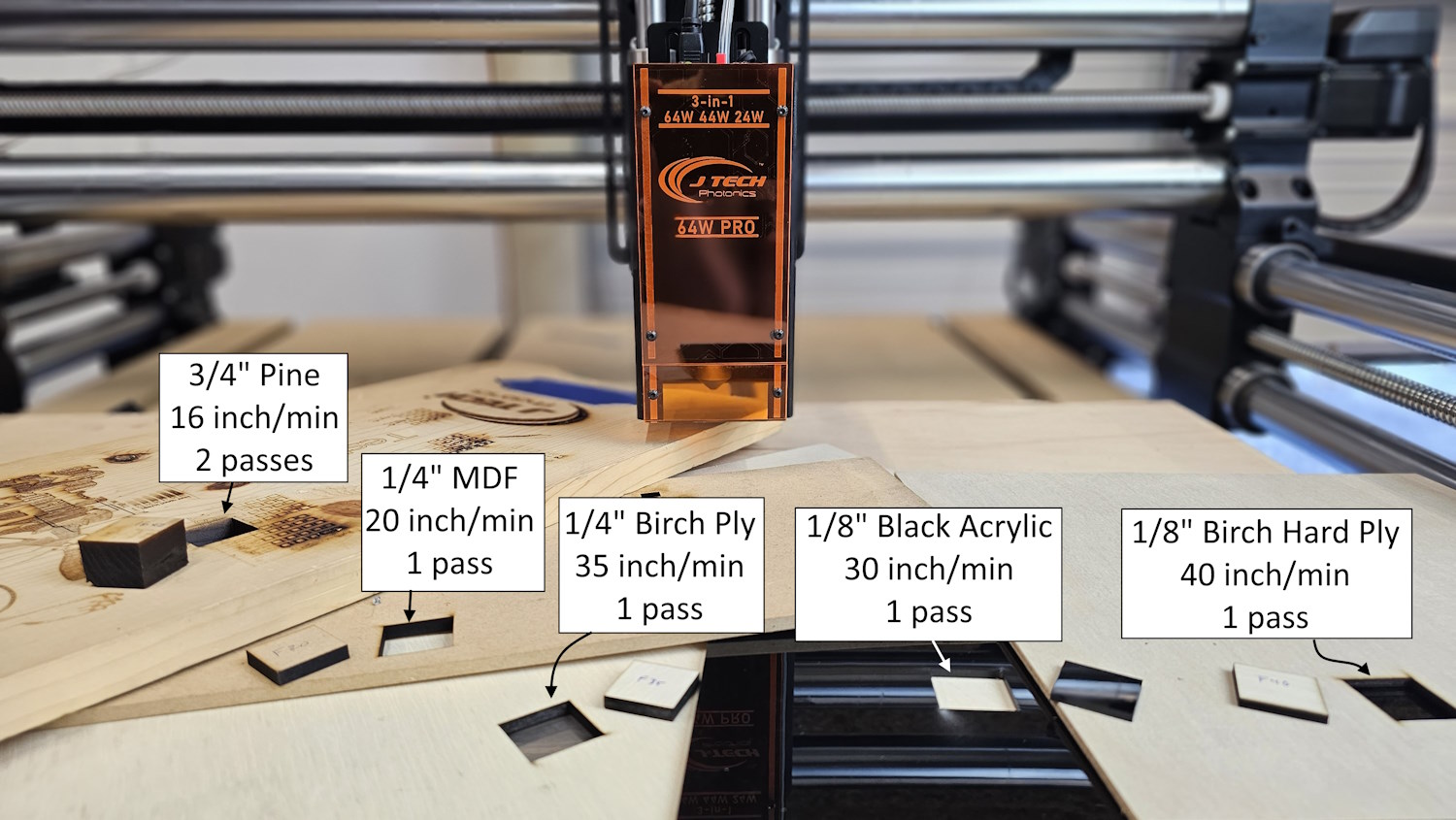
The 64W is a cutting machine and can tackle most any wood you throw at it.
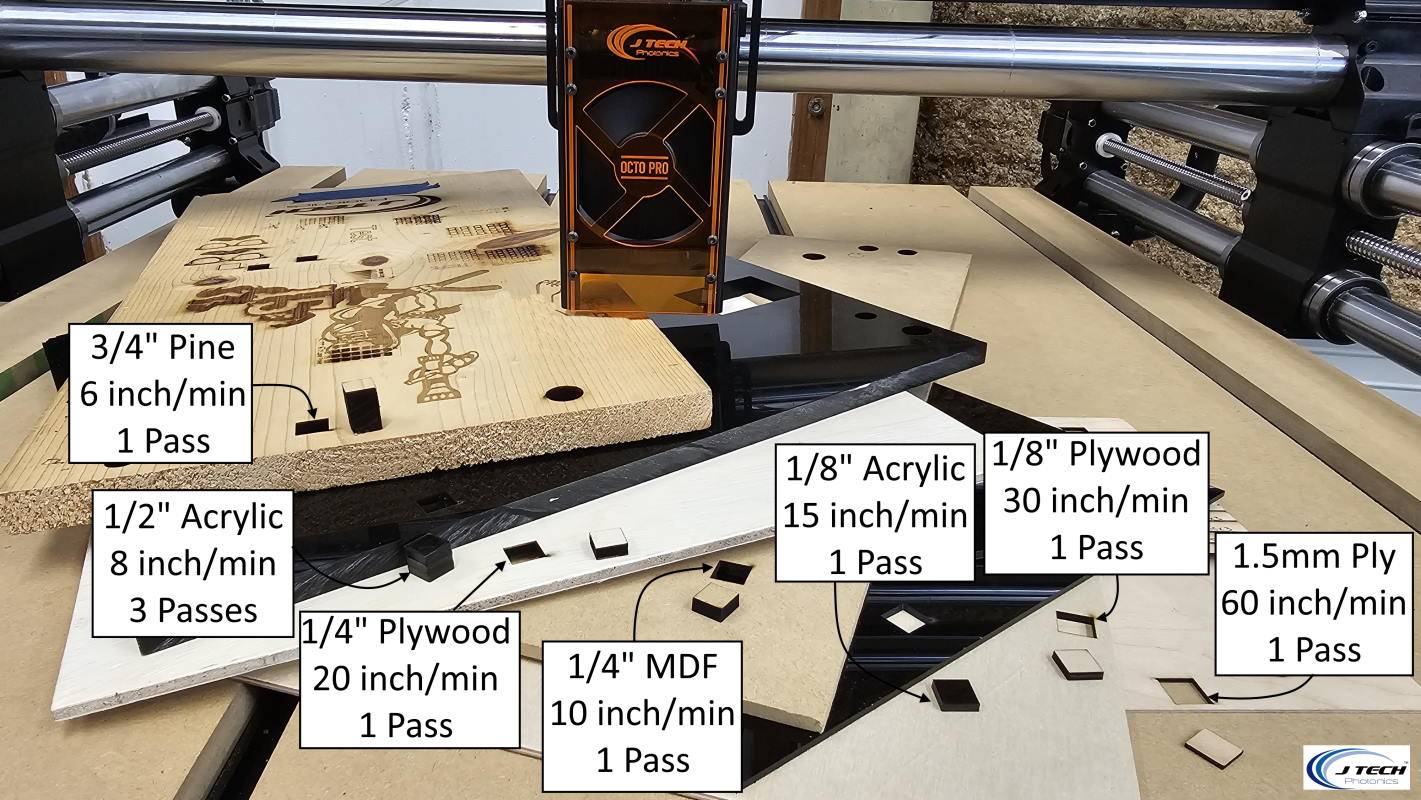
The 44W is a solid cutting laser and can cut through various materials with ease.
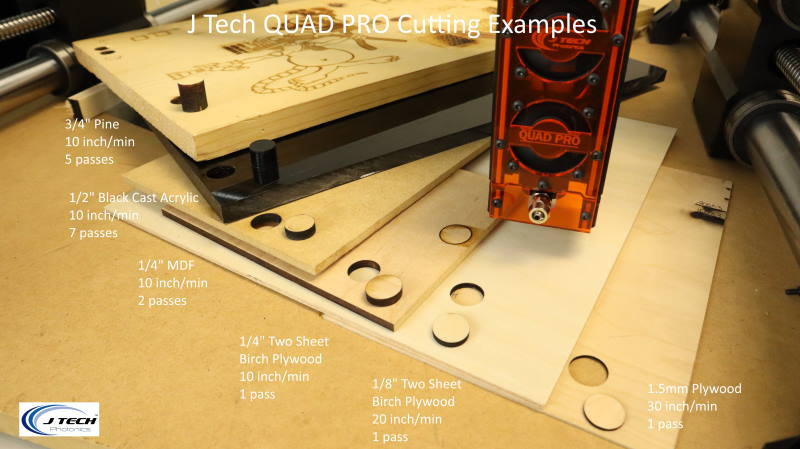
The 24W laser can cut many of the standard materials, just slightly slower.
Tips for Tuning Your Settings
- Always start with test burns on scrap material.
- Use air assist to improve edge quality and reduce charring.
- For engraving photos, use lower power and faster speeds to preserve shading detail.
- Watch for smoke and listen—a “sizzling” sound can indicate burning, not cutting.
Safety First
- Always wear your laser safety goggles.
- Never operate unattended.
- Use the safety interlock and key switch included with your laser system.
Final Thought
Your J Tech laser—especially powerful ones like the 64W—can handle a wide range of projects. This guide gives you a solid foundation, but each material behaves differently. With time and experimentation, you’ll dial in the perfect combination for any job!
Don’t have a J Tech Laser for your CNC? Check these all in one bundles for popular CNC machines HERE!
Have more questions? Reach out at [email protected].