
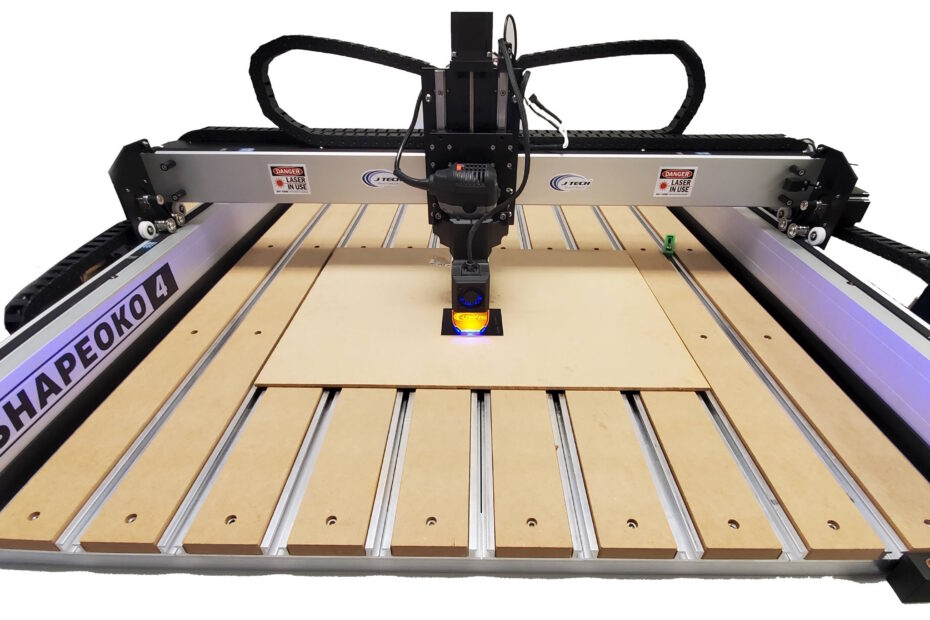
A Shapeoko laser upgrade usually starts with a simple question: should you add a laser to the CNC you already trust, or buy a separate machine and make room for one more tool? For many Shapeoko owners, the answer comes down to workflow, space, and how much value they can get from the machine already on the bench. If your goal is engraving, marking, and light cutting without replacing a solid CNC setup, adding a laser can be the more practical move.
That said, not every upgrade path is equal. A laser on a Shapeoko is not just a bolt-on accessory. It is a machine integration project that touches mounting, motion control, software setup, material handling, and safety. Done right, it expands what your CNC can do. Done casually, it creates frustration fast.
When a shapeoko laser upgrade makes sense
The strongest case for a Shapeoko laser upgrade is straightforward: you already have a capable motion platform, and you want laser functionality without buying a completely separate system. That can be a smart decision for small shops, makers, and prototype environments where every square foot matters.
A Shapeoko already gives you precise XY motion, a familiar work area, and an established workflow for fixturing parts. Adding a laser lets you handle jobs like wood engraving, coated metal marking, acrylic work on compatible materials, paper products, and certain thin stock operations, depending on the laser power and setup. For many users, that means one machine can move from milling a part to engraving graphics or labels on the same platform.
The trade-off is that a CNC router and a laser do not behave the same way. Routers tolerate some mess and mechanical noise. Lasers demand cleaner process control. Beam alignment, focus, shielding, airflow, and software settings matter more than many first-time users expect. If you want a fast plug-and-play experience with no setup learning curve, a laser upgrade may feel more involved than expected.
What to check before buying a Shapeoko laser upgrade
Compatibility is the first filter. You need to know which Shapeoko model you have, what controller it uses, and how the laser will receive control signals. Newer and older machine versions can differ in wiring, mounting options, and firmware behavior. A machine-specific solution is usually the safer path because it reduces guesswork in both installation and operation.
Mounting is next. A good mount does more than hold the laser in place. It needs to position the beam correctly, keep alignment repeatable, and make install or removal realistic for day-to-day use. If you plan to switch between routing and laser work often, quick-change or magnetic mounting can make a real difference in shop efficiency.
You also need to think about workholding and Z clearance. A laser module changes the front-end geometry of the machine. Depending on your setup, you may need to adjust how you secure material, where you set focus, and how you manage dust shoes or other accessories already installed on the router.
Then there is power and control integration. A proper laser upgrade kit should account for driver requirements, control signal compatibility, and predictable on-off or variable power behavior. This is not the place to improvise with random parts. Stable driver performance and clean signal integration have a direct impact on engraving quality and reliability.
Software matters more than most users expect
Hardware gets the attention, but software setup is where many Shapeoko laser upgrade projects either become productive or stall out. You need a workflow that translates designs into laser motion and power commands accurately. That includes image engraving settings, vector cut parameters, machine speed tuning, and material-specific test work.
If you already use CNC software comfortably, that helps, but laser processing has its own logic. Power is not spindle RPM. Focus is not cutter stickout. Raster engraving is not the same as contour toolpaths. The learning curve is manageable, but it is real.
Most users benefit from software that supports laser-specific workflows cleanly, especially for grayscale engraving, fill operations, and job preview. It also helps to have setup documentation that explains controller configuration and test procedures instead of assuming prior laser experience. Support resources matter here because small configuration errors can waste material quickly.
Performance expectations: engraving, cutting, and speed
A shapeoko laser upgrade can produce excellent engraving results, but expectations should match the job type and the diode class being used. Engraving and marking are usually where upgraded CNC platforms shine first. Logos, text, artwork, serial numbers, product personalization, and coated metal marking are common use cases that fit the machine well.
Cutting is more conditional. Material type, thickness, color, glue content, and air assist all affect results. Thin wood, paper, cardboard, and some acrylic applications may be reasonable depending on the setup. Thicker material or production-scale cutting can push beyond what many diode systems do efficiently. If most of your business depends on heavy laser cutting throughput, you should compare that need honestly against a dedicated machine.
Speed also depends on the result you want. A fast pass that leaves a weak mark is not really productive. Clean edges, consistent fill, and repeatable depth depend on balancing power, travel speed, focus, and airflow. Users who approach laser setup like process tuning rather than gadget installation usually get better outcomes.
Safety is not optional on a laser upgrade
This is the part that should be treated with zero shortcuts. A laser is not just another spindle accessory. It introduces optical hazards, fire risk, fumes, and reflection concerns that a router alone does not.
At minimum, you need proper eye protection matched to the laser wavelength, shielding appropriate to the setup, and serious attention to fume management. Material choice matters too. Some materials should not be processed with a laser because of hazardous emissions or poor cutting behavior. If you are unsure about a material, do not guess.
Fire awareness is part of normal operation. Laser work should be supervised, not left running unattended while you step away. Even routine engraving on common materials can flare up if focus, speed, or airflow are off. A good setup includes practical provisions for observation, emergency stop access, and air movement that helps both cut quality and combustion control.
This is one reason support-focused suppliers stand out. Good hardware is only part of the equation. Clear safety guidance, setup documentation, and troubleshooting support reduce the chance of costly mistakes.
The real value of a machine-specific upgrade path
Generic laser parts can look cheaper at first, but the hidden cost usually shows up in integration time. Adapters that almost fit, drivers that almost communicate properly, and instructions that almost match your machine can turn a weekend project into a long troubleshooting cycle.
A machine-specific Shapeoko laser upgrade is usually worth it because it reduces variables. The mount is designed for the platform. The wiring approach is known. The control method has already been tested. Documentation aligns with the hardware you actually own. That does not eliminate setup work, but it turns the job into a structured install instead of an experiment.
For serious makers and small shops, that matters. Every hour spent solving avoidable fitment or control issues is an hour not spent making parts, testing products, or delivering customer work. That is one reason many users prefer suppliers focused on CNC laser retrofits rather than generic laser components. J Tech Photonics has built its reputation around exactly that kind of practical compatibility and support.
Is a Shapeoko laser upgrade right for your shop?
If your Shapeoko is already central to your workflow, adding laser capability can be one of the most cost-effective ways to expand what the machine can do. It makes particular sense when you want engraving, marking, and selective light cutting on a platform you already know how to run and maintain.
It is less ideal if you need nonstop production cutting, a fully enclosed laser-first environment, or a totally separate process lane for safety and workflow reasons. In those cases, a dedicated machine may still be the better fit.
The best decision usually comes down to how you plan to use the laser week after week, not just what looks possible in a demo. If you choose the upgrade route, focus on compatibility, control integration, safety, and support from the start. A well-planned setup gives you a more capable machine. A rushed one gives you another unfinished shop project.
Start with the machine you have, define the jobs you actually need to run, and build the laser system around that reality.
To purchase a all in one bundle for the Shapeoko line of machines, visit the all in one Shapeoko bundles here.