

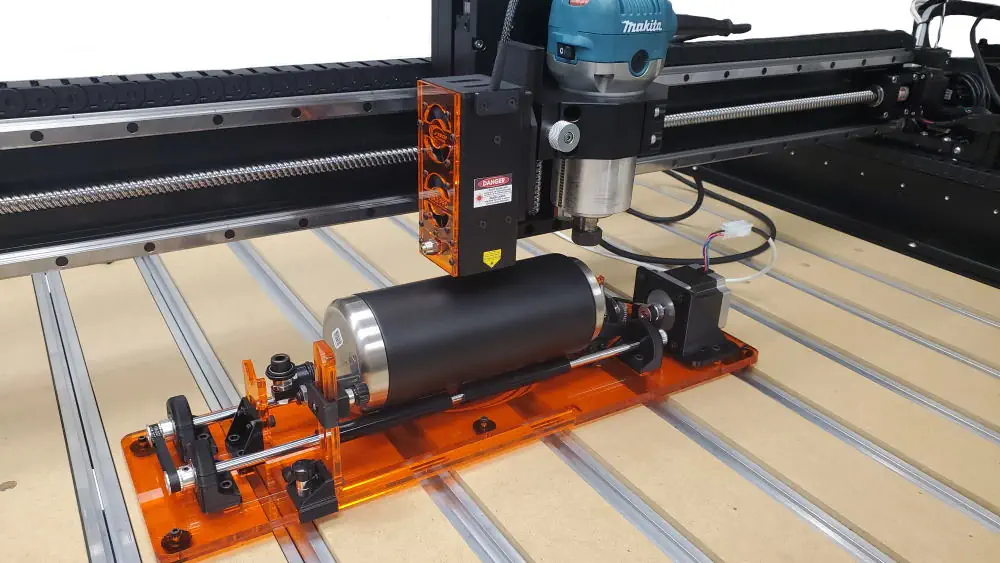
A stainless tumbler that looks easy on the screen can turn into a frustrating job once it starts rolling under the beam. That is where a rotary attachment for laser engraving stops being an accessory and starts being part of a reliable workflow. If you want clean artwork on cups, mugs, tools, tubes, and other cylindrical parts, the rotary setup matters just as much as laser power, focus, and software settings.
For CNC owners adding laser capability to an existing machine, rotary engraving is one of the first jobs that exposes the difference between a basic setup and a production-ready one. Flat work is straightforward. Round work introduces slip, diameter changes, centerline issues, and material handling problems that can ruin alignment even when the artwork file is correct. The right rotary system solves those problems by controlling rotation in a predictable way that your laser software can use.
What a rotary attachment for laser engraving actually does
A rotary attachment rotates the workpiece while the laser engraves across its surface. Instead of treating the object like a flat part, the machine maps motion around the circumference. That lets you engrave text, logos, scales, and artwork on items that would otherwise move out of focus or distort badly during the job.
In practical terms, the rotary replaces one axis of travel with controlled rotation. On many systems, that means the Y-axis motion is translated into rotational movement. The laser still needs proper focus, stable mounting, and software configuration, but the rotary provides the mechanical link that makes the engraving path track correctly around the part.
That sounds simple, but there are trade-offs. A rotary does not make every round object easy to mark. Tapered drinkware, off-center castings, handles on mugs, and soft-coated surfaces still need careful setup. The attachment gives you control, not immunity from bad fixturing or incorrect settings.
When rotary engraving makes sense
If you engrave tumblers, insulated bottles, flashlights, pens, anodized tubes, sockets, or small production batches of cylindrical products, rotary capability is usually worth adding. It is especially useful when appearance matters and the customer will notice if a logo drifts, wraps unevenly, or starts and stops with a visible seam.
For many CNC users, the bigger advantage is not just job variety. It is efficiency. Without a rotary, you end up improvising with V-blocks, partial indexing, or multiple manual repositioning steps. That approach can work for one-off parts, but it is slow and hard to repeat. A proper rotary setup reduces operator guesswork and makes it easier to run the same item again with the same result.
If your work is mostly flat signs, sheet stock, and panel engraving, a rotary may sit on the shelf more than you expect. This is one of those cases where the right answer depends on your job mix. The value is high when cylindrical engraving is part of your normal workflow. It is much lower if round work is rare.
Roller vs chuck style rotary attachment for laser engraving
Most users end up choosing between roller-style and chuck-style rotary systems. The right one depends on the parts you engrave, not just what looks more precise.
A roller rotary supports the part on driven rollers. It is fast to load, flexible across many diameters, and well suited for tumblers, bottles, and similar parts. If your shop handles a range of drinkware, roller systems are usually the practical choice because setup is quick and there is no need to clamp each item into jaws. The trade-off is traction. If the surface is slick, the part is heavy, or the coating varies, slipping can show up in the engraving.
A chuck rotary grips the part directly. That gives you more positive drive and often better control on smaller parts, but loading can be slower and the usable range may be narrower depending on jaw design and part geometry. Chuck systems are a strong option for pens, tools, and more rigid cylindrical parts where grip consistency matters more than quick changeover.
Neither style is universally better. For drinkware and mixed production, roller systems are often easier to live with. For parts that need firm indexing or cannot rely on friction alone, a chuck may be the better fit.
Compatibility matters more than most buyers expect
The first question should not be whether the rotary looks well built. It should be whether it integrates cleanly with your machine, motor control, and software workflow. On a CNC laser upgrade, rotary performance depends on the full system: mounting space, cable routing, controller support, steps-per-rotation setup, and how easily you can switch between standard axis motion and rotary jobs.
This is where machine-specific support matters. A rotary that works perfectly on one platform can be annoying on another if the electrical connection is awkward or the setup procedure is unclear. Users with older maker platforms and DIY machines know this already. The hardware might be physically compatible but still require extra tuning to get smooth motion and accurate circumference scaling.
If you are upgrading an existing CNC rather than buying a dedicated laser machine, pay attention to how the rotary fits into your actual work envelope. You need enough clearance for the part diameter, enough Z travel or mounting flexibility to maintain focus, and a straightforward way to secure the laser head without introducing vibration or alignment issues.
Setup details that affect engraving quality
Most rotary engraving problems are setup problems, not laser problems. The artwork may be fine and the beam may be focused, but the part is either not rotating consistently or not positioned correctly relative to the laser.
Start with the mechanical basics. The object needs to sit level and rotate without wobble. The laser should be focused at the correct height for the surface being engraved, and if the item is tapered, you need to decide whether the design can tolerate that taper or whether the part needs a different support method. On coated tumblers, even a small angle error can make the engraving line width change across the design.
Then there is calibration. Rotary steps per rotation must be correct or your artwork will stretch or compress around the circumference. This is one of the most common issues for first-time users. If a circle engraves as an oval or text spacing looks wrong when the wrap completes, calibration is usually the first place to look.
Material behavior matters too. Powder coat, anodized finishes, painted surfaces, and bare metals all respond differently. The rotary does not change that. It only keeps the motion accurate. You still need to test speed, power, interval, and image processing settings for the specific finish you are marking.
Software workflow and repeatability
A good rotary process should be predictable from file setup to finished part. That means your software needs to support rotary mode cleanly and give you an easy way to enter diameter or circumference values, preview layout, and maintain orientation across repeated jobs.
For most users, repeatability is the real benchmark. Can you load the same tumbler tomorrow and get the logo in the same place with the same wrap and the same edge quality? If not, the issue is usually in your workholding method, origin routine, or rotary calibration procedure.
This is why documentation and support are not extra features. They are part of the hardware value. A technically capable user can solve a lot, but clear setup instructions, known machine compatibility, and troubleshooting guidance save time and prevent avoidable mistakes. That is especially true when adding a rotary to a CNC platform that was not originally designed around dedicated laser production.
Safety and shop reality
Rotary jobs often look simple because the part is small. The risk is not. You are still operating a laser system, often with coated metals, painted surfaces, or plastics nearby in the workspace. Safe operation requires proper shielding, fume management, and attention to reflections, especially on curved surfaces.
You also need to think about part retention. If a cylindrical item shifts during the job, you do not just lose the engraving. You may send reflections where you do not want them or crash the setup if the part walks out of position. A stable rotary arrangement is part of safe operation, not just quality control.
Choosing the right rotary for your shop
The best rotary attachment for laser engraving is the one that fits your actual machine and the parts you really run. If your work centers on tumblers and bottles, prioritize quick loading, stable roller contact, and enough clearance for larger diameters. If you mark smaller precision parts, stronger grip and repeatable indexing may matter more. If you switch between jobs often, look closely at how fast you can install, configure, and return to normal flat engraving.
For CNC upgrade users, the smartest purchase is usually the one backed by real compatibility guidance and practical support, not just a spec sheet. J Tech Photonics has built a strong reputation around that exact problem – helping users add laser capability to existing machines with hardware, documentation, and setup resources that match how makers actually work.
A rotary should make cylindrical engraving feel controlled instead of improvised. When the hardware fits the machine, the software is configured correctly, and the part is held securely, round items stop being special cases and start becoming repeatable jobs you can quote with confidence.
Check out the J Tech Photonics Rotary Accessory Here today.